What Is AI Automation? A Small Business Guide (2026)
AI automation handles follow-up, support, and admin work without a person. What it costs, what breaks, and how to start without wrecking your setup.
A missed call at 4:40 on a Friday is a job you never get to quote. Most owners lose that job on response time.
AI automation puts AI on work that used to need a person. It sorts email, follows up on leads, answers routine questions, and drafts quotes. Unlike fixed rules-based automation, it reads messy input and decides what to do next. Start with one workflow and expand as it pays for itself. For the broader definition, see what is automation.
TL;DR
- AI automation gives a workflow judgment, so it handles input that does not match a rule.
- 23.2% of US businesses reported using AI in a business function during the two weeks ending September 6, 2026, per the Census Bureau.
- Hosted tools start between $15 and $37 a month for one paid seat, per Zapier’s roundup of AI automation tools in 2026.
- Most projects fail on data quality and missing human review.
- The first workflow should be one job you already check by hand.
Most pages on this term come from cloud vendors explaining their own products. This one comes from an owner who runs his own lead generation on these tools daily, which is where the honest numbers live.
What is AI automation, and how is it different from a chatbot or plain automation?
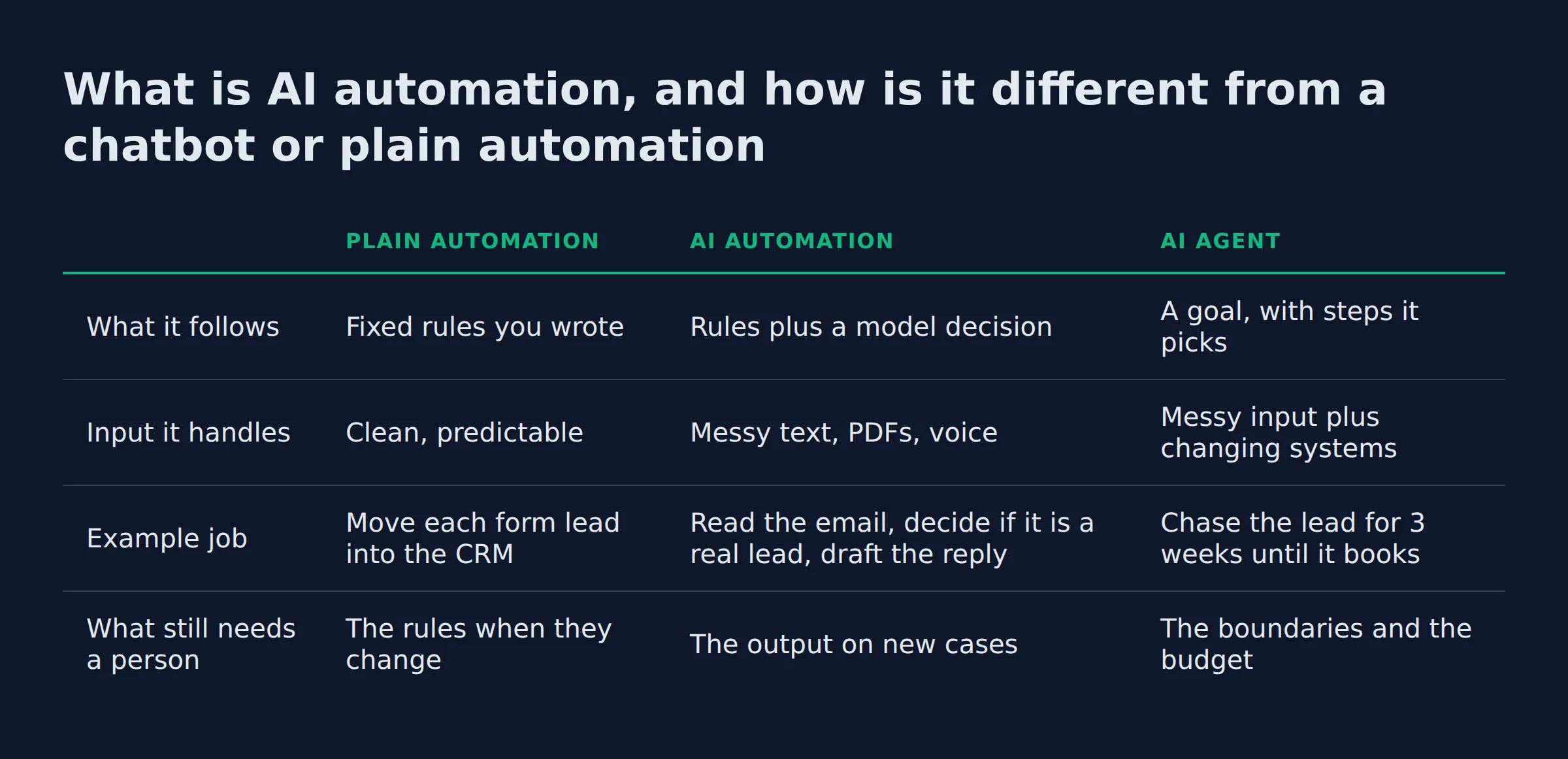
AI automation pairs a software robot with a model that reads messy input, so the workflow can decide what happens next. Plain automation repeats steps that never change. A chatbot answers and stops. AI automation finishes the task and writes the record.
AWS frames the category as AI expanding what robotic process automation (RPA) can do, the technology behind AI automation. The bot still clicks, copies, and moves files. The model adds the judgment about what this document, email, or call actually is.
Salesforce lays out how AI automation actually works in five stages, and the list is worth knowing because it names where the work lands:
- Data collection gathers the records, emails, and documents the workflow will read.
- Data preparation cleans that material into a format a model can use.
- Model training teaches the system what a good answer looks like on your history.
- Execution runs the decision inside the live workflow.
- Continuous learning feeds corrections back so accuracy improves over time.
That last stage is the real break from old automation. Salesforce draws the line the same way. Traditional automation follows a fixed set of rules. AI automation changes as new data arrives and people correct it, and Salesforce calls that correction step human-in-the-loop feedback. It runs inside the workflow by design.
The tool vocabulary matters, because it shows up in every vendor pitch you will read.
Foundation models carry the language ability, and large language models (LLM) are the text engine behind most of it. Multimodal models read voice, image, and video, not just text. Retrieval-augmented generation (RAG) pulls from your own documents before answering.
Prompt engineering is the instruction layer. Smart assistants are the packaged version, and Microsoft Copilot and Salesforce Agentforce sit in that group. Agentic AI describes systems that plan several steps ahead. Workflow automation is the older name for the plumbing they run on.
| Plain automation | AI automation | AI agent | |
|---|---|---|---|
| What it follows | Fixed rules you wrote | Rules plus a model decision | A goal, with steps it picks |
| Input it handles | Clean, predictable | Messy text, PDFs, voice | Messy input plus changing systems |
| Example job | Move each form lead into the CRM | Read the email, decide if it is a real lead, draft the reply | Chase the lead for 3 weeks until it books |
| What still needs a person | The rules when they change | The output on new cases | The boundaries and the budget |
The practical test is where the decision sits. If a person wrote every branch in advance, you have automation. If the model decides the branch, you have AI automation. The real answer lives in your error log.
What can AI automation actually do for a small business?
For a small business the useful work sits in a handful of places. It answers and books inbound calls, then follows up on quotes. It chases invoices and keeps the CRM current. Each one is a workflow you can hand over, check, and price.
The big vendors describe the same jobs at a scale most owners will never reach. AWS lists efficiency, decision-making, and innovation as the benefits, with use cases across the company. Oracle names customer service, manufacturing, and supply chain among its examples, and the list reads like a factory floor.
Here is the same list translated for a 5-person shop:
- Sales. A new form lead gets a reply in 2 minutes, then 3 follow-ups over 3 weeks if nobody answers.
- Customer service. Routine questions get answered from your own price list and service area, and the rest get routed to a person.
- Marketing. Reviews, listings, and posts get drafted on a schedule instead of in a burst every 5 months.
- Inbound calls. An AI receptionist answers the missed call, takes the address and the job type, and books it into your calendar.
- Admin. Invoices get chased, notes get summarized, and the CRM stops holding last month’s phone number.
- IT and back office. Helpdesk tickets get sorted by type, and field service software gets updated after each visit.
The missed call is the one I would fix first. A voicemail from a homeowner with a leaking water heater is a lead you already paid to attract. It goes cold in an hour.
I run my own lead generation this way. About 200 form submissions a day land in my own outreach system, and none of the follow-up happens by hand any more. That volume is not impressive on its own. What matters is that the system answers in minutes at 9pm on a Sunday, which is when a person would not.
Pick a job that repeats every week and that you already check by hand. That pairing is what makes the first build safe.
The three-check test before you automate anything
A workflow is worth automating when it clears 3 checks. It repeats weekly, a mistake shows up in under a minute, and the input arrives in one place you control. Fail any of them and the project stalls in week 2.
Run the checks in this order:
- Does it repeat? Weekly or more often. A once-a-quarter job never earns back the setup time.
- Can you catch a bad output fast? A wrong quote is dangerous. A wrongly tagged lead is cheap to fix.
- Is the input in one place? Email, forms, and your CRM count. A folder of photos on someone’s phone does not.
I run this test on my own systems before I add anything. The failure I want to avoid is a workflow that runs silently and wrongly for a month. The check that saves me most often is the second one. Anything a customer reads gets a person on the approval step. That rule is about risk, and it holds even when the model is right.
Write the three answers down before you build. If you cannot answer check 3, the project is a data cleanup job first.
What does AI automation cost per month?
One workflow on a hosted tool usually runs $15 to $37 a month for one paid seat, plus a few dollars of model usage. Self-hosting drops the subscription and adds maintenance. The setup week and the upkeep are the largest costs, and no vendor lists them.
The pages ranking for this keyword skip the number. Salesforce, AWS, and IBM describe value instead of price. Oracle’s own FAQ answers the cost question with stages of spend instead of a figure. Its line items are model expertise, hosting, and data platforms. That is as close as a page-one winner gets to a price, and it is still not a number.
Here is what the tool layer actually costs, from the pricing in Zapier’s 2026 roundup:
| Tool | Best for | Entry price |
|---|---|---|
| Zapier | Connecting 9,000+ apps without code | Free plan, paid from $19.99/month |
| Microsoft Power Automate | Teams already on Microsoft 365, with Copilot-assisted building | From $15/month |
| n8n | Self-hosting on your own server | Free Community edition, paid from $24/month |
| UiPath | Screen-level automation of old software | From $25/month |
| Gumloop | Extracting data from messy documents | Free tier of 2,000 credits and 1 seat, paid from $37/month |
| Boomi | Legacy and on-premise systems | Quote-based, pay-as-you-go from $99/month |
Model usage is the small line now. The Stanford AI Index records one drop that explains why. Running a system at GPT-3.5’s level cost over 280 times less by October 2024 than it did in November 2022, per that report. Inference is cheap enough that the model bill rarely decides whether a workflow pays off.
The billing shape matters more than the headline price. Seats get counted per person. Credits get counted per task, and both meters reset monthly. Gumloop’s free tier lists 2,000 credits a month and a single seat, which puts the same decision in front of you twice. A workflow that reads 400 emails a month needs a different plan than one that reads 40.
My own stack bills monthly and the tool bill has never been the problem. What costs me is the week an upstream form changes a field name and the workflow quietly stops matching. Nobody notices until a lead goes unanswered. That cost is attention, and it does not show up on the invoice.
Budget the subscription in minutes and the setup and upkeep in hours. The hours are where the money is.
What usually blows the budget
Rework is the line item nobody quotes. Three costs sit beyond the subscription: the checker’s seat, the morning an app change costs you, and model use on the wrong job.
- The seat for the checker. Someone has to glance at the output, and that seat often costs the same as the builder’s.
- Rebuild time after an app change. A renamed form field or a new inbox layout can eat a morning.
- Model usage on the wrong job. A large model sorting simple labels wastes money that a small model handles for cents.
Can you get AI automation free, or build it yourself without code?
Yes, with a catch. A free tier covers a simple workflow, and a no-code builder gets you there without a developer. Free usually means fewer steps, one seat, and you doing the maintenance.
Zapier’s free plan is limited to two-step workflows, which is the constraint to plan around. A two-step workflow is still enough for the highest-value job on the list: new lead in, reply out. Add the follow-up sequence and a record update, and you are on a paid tier.
The free and cheap paths split 3 ways:
- Hosted, free tier. Zapier and Gumloop give you a working workflow and a step or credit limit.
- Self-hosted. n8n’s Community edition is free software you run yourself, and the maintenance is yours too.
- Free inside software you already pay for. Power Automate ships with many Microsoft 365 plans, and CRM and field service tools are adding automations as standard features.
Make is the other name you will see on page one, and its visual builder suits people who think in flowcharts rather than forms.
The decision that matters is who fixes the workflow when a form field changes in month 4. If the answer is “me”, the free path is honest.
If the answer is “nobody”, the workflow will keep running until it stops. Nobody will notice for weeks. That is the call I would make before choosing a tool, and it is why the next agent to build matters more than the platform.
 AutomateReal skills
This site covers which AI agent to build first if you want the ordering logic. Free is a real option for one simple workflow, and a trap for a business that will not own the upkeep.
Where these projects fail, and who owns the fix
Most failures come from 3 places: bad input data, no person checking the output, and no named owner after handover. The model is rarely the reason. Oracle puts data quality and cost first among implementation problems, and it says outright that inconsistent or erroneous data leads to inaccurate results.
Oracle also names 2 myths worth killing. The first is that AI automation only suits large enterprises with deep pockets. The second is that it replaces labor wholesale. Its own answer is that cloud tools put the work in reach of small and midsize businesses, and that the jobs change rather than vanish.
The failure list I would hand an owner:
- Bad input data. Two phone number formats and a missing email column will break a follow-up sequence.
- Hallucination. A model can state a price or a date that is wrong, with full confidence. The Stanford AI Index tracks a sharp rise in AI incident reports and a new set of factuality and safety benchmarks, which exist for this reason.
- No human review on customer-facing output. Salesforce treats the correction step as part of the loop, not an exception to it.
- No owner after handover. Someone has to read the error log, update the prompt, and notice when a workflow goes quiet.
- Resistance inside the team. Oracle lists it as a real implementation challenge, and the fix is showing people which tasks leave their desk, not which jobs do.
- Data rules you did not check. Health data and financial records carry their own handling rules. The NIST AI Risk Management Framework is the closest thing to a shared checklist, and it has been public and voluntary since it was released on January 26, 2023. Its generative AI profile followed on July 26, 2024, and both documents are free to read.
On HIPAA and customer privacy, treat the question as one for your own adviser. The plain version for an owner: if a workflow touches patient or payment data, the data path is a legal question first. That is the governance layer, and it costs 20 minutes before you hand a workflow your customer list.
Write the ownership rule on day one. Every workflow needs a named person who reads its failures, and that person is usually the owner.
Who owns the workflow after handover
A named person owns the workflow, or nobody does. Set 3 rules before launch, because handover is the step owners skip.
- One name. The workflow page lists who watches it, and that name is a person rather than a team.
- A daily glance. Someone reads the error log in the morning, since a silent stop costs leads.
- A manual fallback. If the workflow is down, the old manual process runs until it is fixed.
A workflow nobody watches stops paying for itself in month 2. That is the quiet failure mode, and it leaves no error message.
How long does setup take, and will it work with the tools you already use?
One workflow takes 1 to 2 weeks of part-time work. You map the steps and connect the tools, then test on live traffic and watch it for a week. It works with your current stack when each app has an API, a webhook, or a connector.
AWS sets out a getting-started path that mirrors how this goes in practice, starting with a written goal and a budget. Its steps are to plan the automation and choose who owns it. Then design the flow end to end, measure the result, and assess how mature the process is.
AWS ties that measurement step to your return on investment, counted in cost savings and time savings. Step 4 is the one owners skip, and it decides whether the workflow keeps its budget.
Integration is where a clean plan meets reality. Oracle notes that moving data between systems adds maintenance cost and can add security exposure. Automation built into software you already own avoids most of that, which is why the fastest wins live in tools you already pay for.
The inbound call case shows how the pieces fit:
- A call comes in after hours, and the AI receptionist answers it.
- It takes the name, address, and job type, then books a slot.
- The record lands in your CRM or field service software with a transcript attached.
- A person reviews anything that looks like an emergency.
If all of that lives in one system, you are live in days. If it spans 4 tools that do not talk to each other, budget the extra week.
Check integration before you check price. A cheaper tool that cannot reach your CRM costs more than the one that can.
Start with one workflow: the first 30 days
The plan below is the one I would run. It front-loads the boring week, because that week decides whether month 2 works.
| Week | What happens | Who touches it | Cost |
|---|---|---|---|
| 1 | Pick one weekly job, write the 3 checks, list the fields the workflow needs | Owner, 2 hours total | $0 |
| 2 | Build the flow in a free or entry tier, connect 2 apps, test with old data | Owner or builder, 4 to 6 hours | $0 to $20 |
| 3 | Run it on live traffic with a person approving every output | Owner, 15 minutes a day | Plan price |
| 4 | Remove the approval step on low-risk steps, add the error log and the owner’s name | Owner, 1 hour | Plan price |
Two rules make week 3 work. Approve every output, and count the corrections. If you correct half of them, the workflow needs better input data.
If you want the upkeep off your plate, the AI services page covers how a managed build works.
 AutomateReal services
If your jobs come from homeowners rather than other businesses, AI automation for home service businesses is the closer fit. For the broader category, see AI agents for a small business.
Start with one workflow, one owner, and one month of evidence. Expand after the corrections drop.
Related: What Is Automation? Definition, Types, and Examples
Related: How to Build an AI Agent
Related: Agentic AI Explained for Small Business Owners
Related: copilot agent builder
FAQ
Which AI agent is best for a small business?
There is no best one, and any page ranking brands for you is guessing. Match the workflow instead. Calls point to an AI receptionist, quotes point to a follow-up sequence, and document piles point to an extraction tool. Pick the job first, then the platform.
Does AI automation replace employees?
No. It takes over tasks and leaves the roles alone. Oracle makes that argument in its own AI automation myths section. First drafts, sorting, and status updates move to the system. The judgment, the customer relationship, and the final call stay with a person.
Can I get an AI agent for free?
Yes. Zapier and Gumloop both have free tiers, and n8n’s Community edition is free to self-host. The ceiling matters more than the price. Zapier’s free plan stops at two-step workflows, and self-hosting leaves the maintenance with you.
Is it safe to give an AI tool access to my business data?
It is as safe as the access you grant. Give the workflow the 3 fields it needs instead of a mailbox password. Keep an approval step on anything a customer reads, and check your own industry rules first. NIST’s AI Risk Management Framework is a free starting point for the questions to ask.
Why do AI automation projects fail?
Bad input data, no human review, and no owner after handover. Oracle lists data quality and cost as the top implementation challenges, and both are process problems rather than model problems. A pilot that nobody measures gets quietly switched off in month 3.
If you want help picking that first workflow, a discovery call maps it in about 30 minutes.