Copilot Agent Builder: What It Is and What It Costs
Agent Builder inside Microsoft Copilot builds a no-code agent on the license you already pay for. Here is what it does, what it costs, and where it stops.
You already pay for Microsoft 365. Someone on your team heard you can build an agent inside Copilot without writing code. Now you need to know what that thing is before you promise it to a customer.
Most pages on this term are Microsoft explaining itself to a tenant administrator. This one answers as the operator who has to run it on a real license.
I run the lead system behind my own agency, and it takes about 200 form submissions a day. Every follow-up in it runs on infrastructure I own, which is why the license question is the first thing I check.
The Copilot Agent Builder builds no-code declarative agents inside Microsoft 365 Copilot. You build one by describing it in plain language, configuring it manually, or starting from a template. It is included with a Microsoft 365 Copilot license at $30 per user per month, and it is free on web content alone.
Say the limit early, because it decides the whole project. An Agent Builder agent cannot author actions that reach a system outside Microsoft 365. The documented fix is to copy the agent into Copilot Studio, and that step carries its own bill.
TL;DR
- Agent Builder is the no-code builder inside Microsoft 365 Copilot. It ships declarative agents for Microsoft 365 in the work and web apps, with no mobile support.
- The seat is $30.00 per user per month, paid yearly, and Agent Builder rides on it.
- Copilot Studio is a separate spend: $200.00 per pack per month for 25,000 Copilot Credits, or a pay-as-you-go meter.
- The hard limit is actions outside Microsoft 365. Inside it, the agent answers from content each person can already open.
What is the Copilot Agent Builder, and how is it different from Copilot Studio?
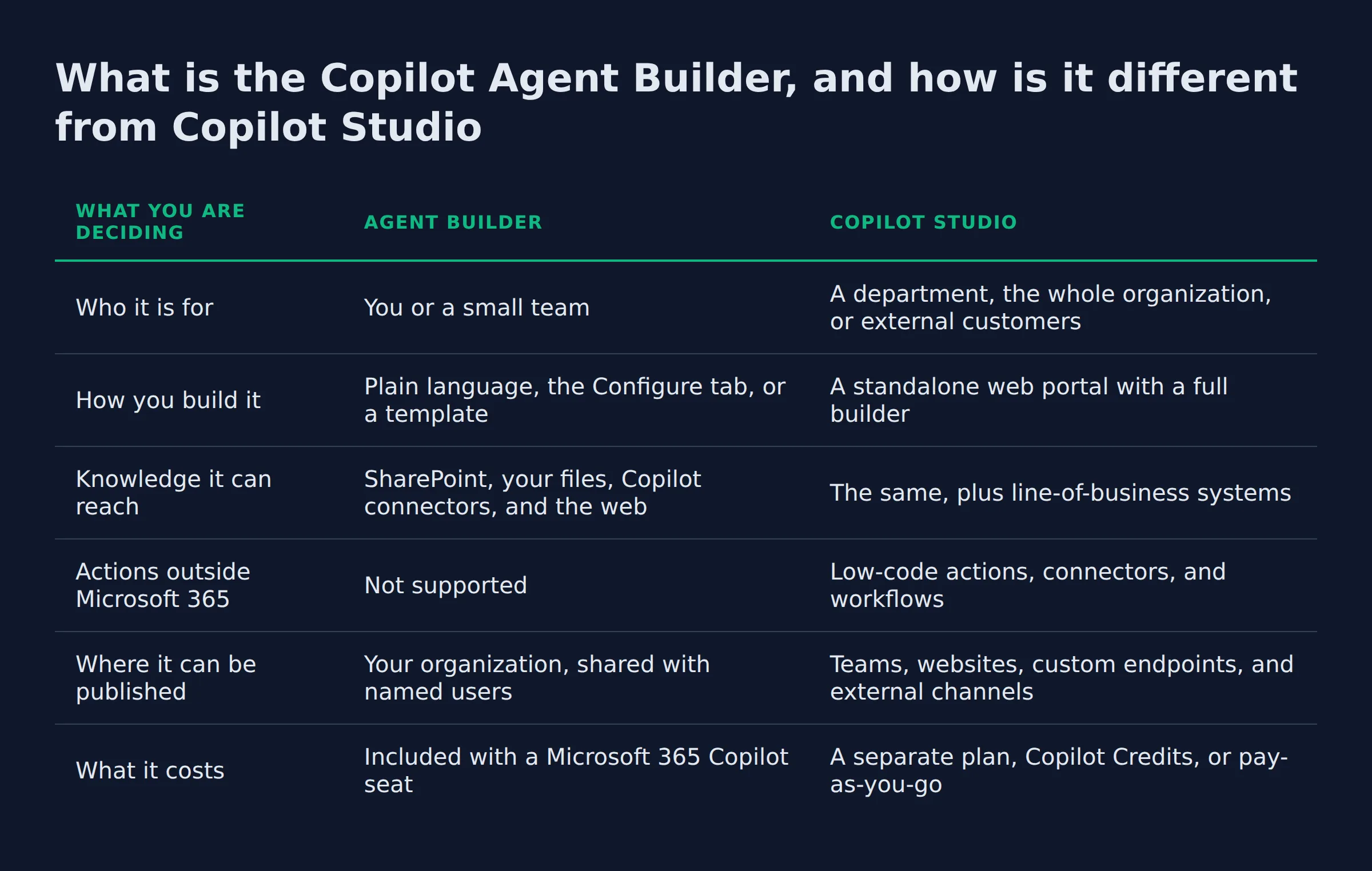
Agent Builder builds declarative agents for Microsoft 365 from plain language, with no code. Copilot Studio is the fuller tool, aimed at a department, external customers, and multi-step workflows.
Both live in the same family and do different jobs. Microsoft’s own rule is that Agent Builder fits an individual or a small team using natural language and existing content, while Copilot Studio fits a department or connector-heavy work.
You get three ways to build an agent. Describe it in natural language, configure it on the Configure tab, or start from a template. Microsoft recommends the natural language route.
The fields are small enough to edit in a sitting:
Name: 30 characters.Description: 1,000 characters.Instructions: 8,000 characters.
Where you find it matters too. The builder sits in the Microsoft 365 Copilot app on Work and Web, and on microsoft365.com/chat and office.com/chat. Microsoft keeps it off the mobile apps.
| What you are deciding | Agent Builder | Copilot Studio |
|---|---|---|
| Who it is for | You or a small team | A department, the whole organization, or external customers |
| How you build it | Plain language, the Configure tab, or a template | A standalone web portal with a full builder |
| Knowledge it can reach | SharePoint, your files, Copilot connectors, and the web | The same, plus line-of-business systems |
| Actions outside Microsoft 365 | Not supported | Low-code actions, connectors, and workflows |
| Where it can be published | Your organization, shared with named users | Teams, websites, custom endpoints, and external channels |
| What it costs | Included with a Microsoft 365 Copilot seat | A separate plan, Copilot Credits, or pay-as-you-go |
If the agent only answers questions from content you already own, Agent Builder is the cheap route. The day it has to act in another system, the build moves to Copilot Studio.
What can the Copilot Agent Builder actually do for a small business?
It answers questions from content you already own. Point it at a SharePoint site or a folder, and each person gets answers built from what they can already open.
Microsoft’s own examples are internal answer jobs, listed on its Agent Builder comparison page. A project FAQ bot works from project documentation. A product assistant works from manuals or wikis. An onboarding agent works from an internal knowledge base. For a small firm the pattern repeats:
- Answering the same questions about your documents.
- Onboarding a new hire without a person walking them through every file.
- Drafting a reply from your saved process notes, which you still send yourself.
The jobs that sent you searching for this tool are the ones it does not do. Missed-call text back, quote follow-up, and inbox triage all need an action in another system.
Agent Builder turns your own files into answers. Anything that has to send, book, or update lives outside it.
Three checks I run before I promise an agent inside a suite someone already pays for
Three checks decide whether an agent survives here: the seat, the permissions, and the owner. Each one takes about ten minutes.
- The seat: confirm the plan carries Microsoft 365 Copilot for everyone who has to use the agent, at $30.00 per user per month, per Microsoft’s pricing page.
- The permissions: the agent runs under the user’s existing access, so a locked folder stays locked, per Microsoft’s governance principles.
- The owner: agents support multiple owners and any owner can edit or delete one, so one name has to sit on the hook, per Microsoft’s sharing guidance.
The seat count is the cheapest thing to check and the easiest to get wrong.
I renew my own software seats every year, and the number in my head is never the number on the invoice.
Two of the three checks are license and ownership questions. They decide whether the agent is still running in month two.
What does the Copilot Agent Builder cost per month?
Microsoft 365 Copilot is $30.00 per user per month, paid yearly, and the seat includes the builder. Copilot Studio is the separate spend: $200.00 per pack per month for 25,000 Copilot Credits, or a pay-as-you-go meter.
Both products are included with a Microsoft 365 Copilot add-on license for authenticated users. A person without that license can still be covered by Copilot Credits or a pay-as-you-go plan.
The buying shapes differ, so here they are side by side:
| What you buy | The published price | What it gets you |
|---|---|---|
| Microsoft 365 Copilot seat | $30.00 user/month, paid yearly | The Copilot experience, and Agent Builder with it |
| Copilot Credit capacity pack | $200.00 per pack/month for 25,000 Copilot Credits | Usage-based capacity for Copilot Studio work |
| Pay-as-you-go meter | No up-front commitment | The same features, billed at the end of the month |
| Standalone Copilot Studio plan | A separate plan | Publishing agents to external channels |
Two footnotes come from the same pricing page. An Azure subscription is required to use agents, and so is a standalone Copilot Studio plan before an agent can publish to outside channels.
One cost line you can cross off, from Microsoft’s own docs: agents built in Agent Builder do not consume the tenant’s Dataverse storage entitlement.
The seat is the small number. The bigger line arrives the day the agent has to touch something outside Microsoft 365.
Is the Copilot Agent Builder free, and what does the free version leave out?
Yes, on web content only. An agent grounded on public web knowledge runs with no Copilot license. The paid seat is what adds your own files and SharePoint sites as knowledge sources.
Microsoft states the free route directly: you can use Agent Builder for free to build agents grounded on web knowledge only. That is a working agent, and it is also a narrow one. Everything that knows anything about your business comes from the paid side.
One tenant switch can override the interface. If an admin turns off web search in Copilot, Microsoft 365 Copilot blocks web content as a knowledge source, and the toggle in the Knowledge pane still looks on. Microsoft labels that a UI limitation.
The free agent answers from the public web. The paid agent is the one that can read your files.
Can a Copilot Agent Builder agent work with the tools I already use?
Inside Microsoft 365, yes. It reaches your SharePoint sites, your Outlook mail, your Teams content, and Copilot connectors. It runs inside the Microsoft 365 Copilot app.
The wall sits at the edge of that boundary. Microsoft states that Agent Builder does not support authoring actions that integrate external services, and the documented path is to copy the agent to Microsoft Copilot Studio.
That copy is the step nobody prices. Microsoft says the work done in Agent Builder is not lost and the extension does not need a start-over, which holds for the instructions and the knowledge. The actions are new work, and so is the testing.
My own follow-up runs on tools I control, so a change to it is an afternoon of my time. Inside a rented suite that same change becomes a ticket, a queue, and someone else’s release schedule.
The copy adds a short list that Agent Builder cannot reach:
- Low-code actions and connectors.
- Multi-step workflows.
- Publishing to Teams, websites, and custom endpoints.
Microsoft’s own Agent Builder known limitations list carries three entries that surprise owners:
- Agents cannot run in Teams group or 1:1 chats.
- Customer Managed Keys are not supported.
- Automatic SharePoint sharing works only with specific security groups.
Agent Builder is cheap while the agent stays inside Microsoft 365. The first outside action is where the second bill starts.
How long does it take to build one, and who has to approve it?
A first agent takes a few minutes and no coding skill. Approval is the slow part. Sharing an agent across the company can wait on an admin policy or an admin review.
Microsoft’s support page states it plainly: you do not need coding skills, and you can build an agent in a few minutes from a prompt or a template.
Approval and habit are the real timeline. Sharing gives named people direct access and does not deploy the agent across the organization. Broad reach goes through the org catalog, where an admin reviews the agent in the Microsoft 365 admin center and deploys it to the Agent Store. An admin policy can also force approval before any share lands.
Microsoft treats adoption as a people problem. Its own guidance is to measure agent makers and agent users separately and to start with the Plan my Day template. That post sits on top of Microsoft’s adoption guidance for building agents.
The published example is HCLTech. It put more than 80,000 employees through a campaign, and active agent users rose from 3,056 to 13,727. That is a 349 percent jump, split across 8,722 licensed and 5,005 unlicensed users. More than a third of the active users there held no Copilot license, which shows the credit route carrying real work.
Build time is minutes. The wait is the admin, and the work is the habit change.
Copilot Agent Builder or something else: what should a small business run?
Run Agent Builder when the job is answering questions from content you already own inside Microsoft 365. Move to Copilot Studio when the agent has to act in another system or face customers. Look past Microsoft when your tools are not Microsoft.
The question is really about where the work stops. If the answer comes from your files and stays with your team, the builder on your seat is enough. If it has to send, book, quote, or message, you need an agent with actions. If your stack sits outside Microsoft, the same decision runs through a different set of tools.
This lane is crowded, and the alternatives split three ways:
- Microsoft’s own: Copilot Studio, Microsoft Foundry, Agent 365, and the Work IQ layer.
- Developer tooling: OpenAI’s Agents SDK and GitHub Copilot.
- Workflow tools: n8n, Zapier, Make, and Lindy AI.
Microsoft also markets Work IQ, the intelligence layer for agents tuned to a company’s own workflows.
I built the agent team that drafted this page, and it runs outside any vendor suite. That was a choice, because the pipeline touches tools that live in different places. A builder inside a single suite would not finish that job.
 AutomateReal skills
The sibling decision on the other big platform was OpenAI’s Agent Builder, which carried the same shape and a shutdown date. How to build an AI agent covers the build itself, in order.
If you are still choosing, which AI agent to build first walks the pick. Google’s version of the same idea is Gemini Agent Mode. When the job is worth more than the build, the done-for-you version lives on our AI services page.
 AutomateReal services
Match the builder to the boundary. Agent Builder stops at the edge of Microsoft 365, and that edge decides the rest.
FAQ
Do I need an IT administrator to turn the Copilot Agent Builder on?
You do not need one to build an agent. A licensed user can build and use one in Microsoft 365 Copilot without touching an admin console. The admin appears at sharing, where a policy can force approval before the agent reaches other people.
Is the Copilot Agent Builder the same thing as Copilot Studio?
No. Agent Builder is the no-code builder inside Microsoft 365 Copilot. Copilot Studio is the fuller portal for departments, external customers, and multi-step workflows. You can copy an agent from the first into the second when the job grows.
Can I use an agent I built in Agent Builder on my phone?
No. Microsoft runs Agent Builder in the work and web apps only, and states that it is not available on mobile versions of the apps and sites. Build on a desktop, and expect the phone to stay out of it.
Can the agent talk to my customers, or only to people inside my organization?
Only inside, by default. Shared agents are for people in your organization, and publishing to outside channels needs a standalone Copilot Studio plan. That is the line between an internal assistant and a customer-facing one.
Does the agent see files that the person asking cannot open?
No. Agents apply no new privileges, so an agent returns only what the signed-in user can already open. A locked folder stays locked for everyone, and that behavior is by design.
If you want help working out whether your first agent belongs inside Microsoft 365 or outside it, a discovery call maps it in about thirty minutes. Bring the task that eats your week, and we will run the numbers on the license before anyone builds anything.