AI Agents Examples: Real Use Cases for Small Business
AI agents examples from real small business workflows: front desk, follow-up, support, and bookkeeping, with what each one costs per month.
The quote goes out at 4:40pm on a Friday. Nobody follows up. Ten days later the homeowner has hired someone else, and the file shows no sign that anything went wrong.
Search “ai agents examples” and you get a thermostat, a robot vacuum, and the Mars rover. All three are real examples of agents. None of them answers your phone on a Saturday.
An AI agent is software that finishes a task, not just answers a question. One example answers missed calls and books the job. Another runs the follow-up on every quote. Another triages the support tickets that repeat all week. Another reconciles the month’s books. Most small businesses start with two.
That is the short answer. The rest of this page is the version you can price, buy, and run this month.
TL;DR
- An AI agent finishes a task. A chatbot returns a reply.
- Textbook agent types run from simple reflex to multi-agent. Only three are for sale to a small shop.
- The jobs that pay: missed-call booking, quote follow-up, support triage, bookkeeping.
- Pricing comes in two shapes. Per seat per month, or per resolved outcome.
- Start with the workflow that was already costing you money.
What is an AI agent, and how is it different from a chatbot or plain automation?
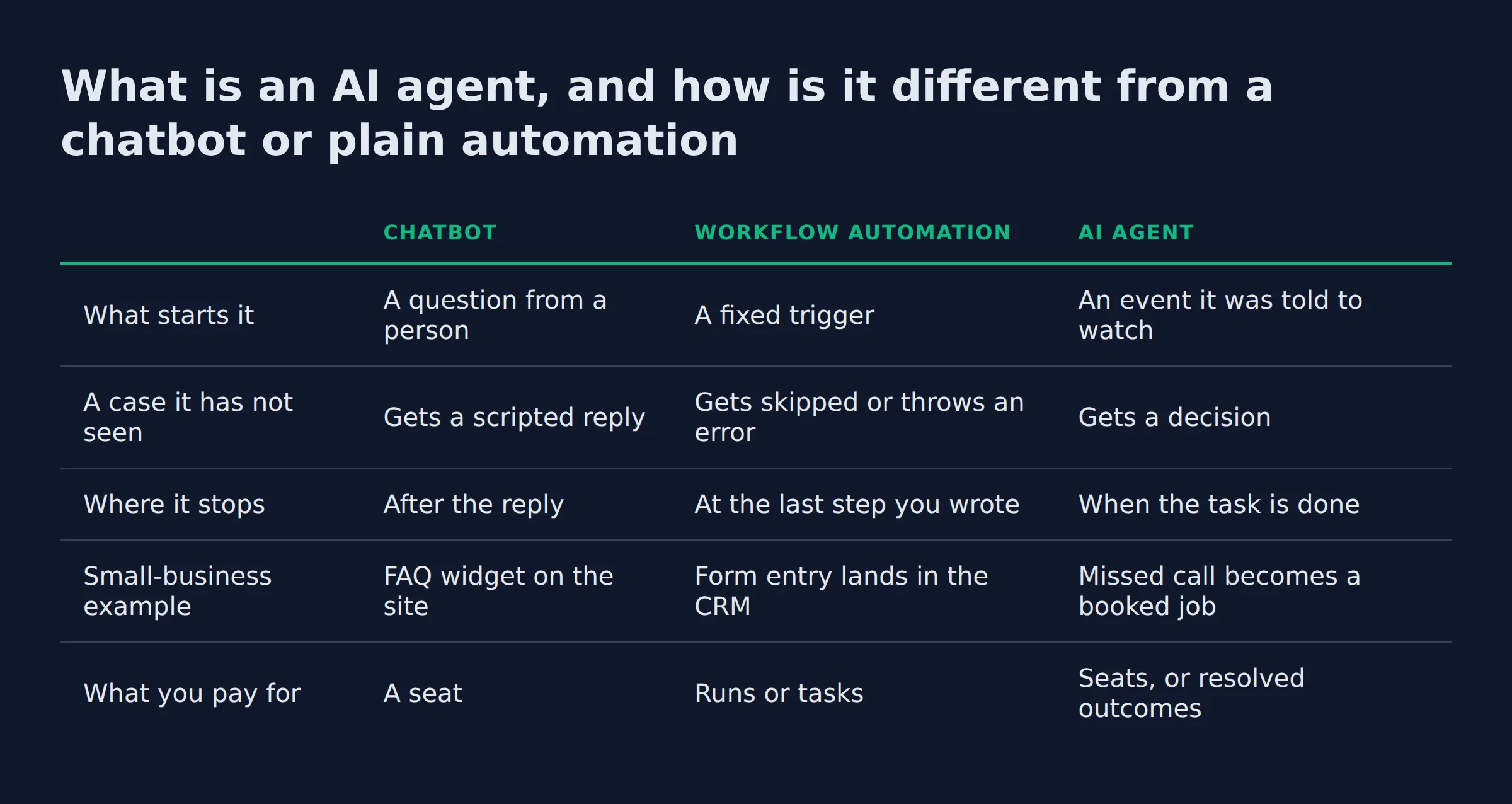
An AI agent takes a task from raw input to a finished action. A chatbot replies. Plain automation follows fixed if-then rules you wrote in advance. The agent reads the situation, decides the next step, and acts inside your existing apps.
Google’s page on how platform vendors define an agent puts it in one line: software that pursues a goal and completes a task on someone’s behalf. Behind that sits the loop every vendor describes. Perceive the input, reason about it, act.
| Chatbot | Workflow automation | AI agent | |
|---|---|---|---|
| What starts it | A question from a person | A fixed trigger | An event it was told to watch |
| A case it has not seen | Gets a scripted reply | Gets skipped or throws an error | Gets a decision |
| Where it stops | After the reply | At the last step you wrote | When the task is done |
| Small-business example | FAQ widget on the site | Form entry lands in the CRM | Missed call becomes a booked job |
| What you pay for | A seat | Runs or tasks | Seats, or resolved outcomes |
If a person still has to finish the task, you bought a chatbot.
Every pitch for ai agents for business turns on the same two words, so keep them apart. A copilot sits beside a person and suggests the next move. An agent takes it. The connector layer that lets an agent open your job book is the Model Context Protocol, written MCP. The same layer reaches your calendar and your inbox.
What are the main types of AI agents, with an example of each?
Agents are grouped by how they decide. Simple reflex agents act on one reading. Model-based reflex agents hold a picture of the world. Goal-based agents pick steps toward a target. Utility-based agents weigh trade-offs. Learning agents improve from data. Autonomous agents run long tasks alone. Multi-agent systems split the work.
Those names come from the standard agent taxonomy in the AI literature, which survives because it still describes what ships. Here is each type with the example the textbooks use.
- Simple reflex. One reading, one action, no memory of last time. The thermostat, the automatic door, the robot vacuum.
- Model-based reflex. It tracks the state of the room and updates as things move. Smart home security and self-driving cars run here.
- Goal-based. It searches for steps that reach the target. Google Maps and Apple Maps route this way, and so do Siri, Alexa, and service chatbots.
- Utility-based. It scores the options and takes the best trade-off. Waymo and Wealthfront sit in this class.
- Learning. It improves from the data it sees. Spam filters, Netflix and Spotify recommendations, drone navigation.
- Autonomous. It runs a long task with nobody steering. Delivery robots, RPA bots in finance, and the Mars rovers.
- Multi-agent. Several agents split one job and compare notes. Drone swarms, smart grids, and the non-player characters in games.
Notice what every example has in common. None of them is yours. Your thermostat belongs to your HVAC system. Your inbox spam filter belongs to your email provider. The Mars rover belongs to NASA.
If you searched for virtual assistant ai examples, the names you can actually buy are narrower. They are the AI receptionist, the AI assistant, and the copilot bolted into software you already pay for.
The textbook types explain the words. The buyable names are the receptionist, the assistant, and the copilot.
What are real examples of AI agents a small business can use this month?
The examples that fit a small shop start with the front desk. An agent answers the call, texts the missed caller, and books the slot. Then come quote follow-up, support triage, and the monthly bookkeeping pass. Each one sits inside software you already run.
A usable example has three parts. The job it takes over, the tool it has to reach, and the monthly number. Anything missing the third part is a demo.
- The front desk agent. It picks up when you cannot, texts the caller back inside a minute, and offers two open slots. Two systems have to be reachable for that: your phone line and your calendar. The tool that carries it is usually one of these:
- Twilio
- GoHighLevel
- The receptionist add-on in ServiceTitan
- The receptionist add-on in Jobber
- The receptionist add-on in Housecall Pro
- The quote chaser. It watches the estimate you sent, nudges on day 3 and day 7, and stops the moment the customer replies. It sits in your CRM, which for most shops is GoHighLevel or the pipeline built into Jobber.
- The support agent. It answers the six questions that fill the inbox and hands the rest to a person. Intercom’s Fin sells this shape and bills per resolved outcome rather than per message, and its price sits in the cost section below. The walkthrough for that job sits in AI agents for customer support.
- The bookkeeping agent. It pulls the month’s receipts, matches them to transactions, and flags the ones that do not line up. QuickBooks is where that work happens for most small firms.
The agents I run myself are the boring version of this list. The team that wrote this page is a content pipeline: one agent researches, one plans, one drafts, one reviews, one publishes. It ships a post a day on a schedule.
My outreach runs on the same pattern. Follow-up is the workflow I moved first. My own lead-gen system takes in roughly 200 form submissions a day, and each one gets a reply path without me touching it.
At two minutes a reply, that volume is close to seven hours of writing a day. That figure was the proof I needed before I believed any of this.
AutomateReal skills
The rule behind both is the one to copy. Take one workflow, hand the repetitive half to an agent, and keep the judgment.
Every example here has a tool it must reach. An agent that cannot open your job book is a chat window.
What a normal Tuesday looks like once one agent is running
The after state is quiet, and that is the point. The phone log shows two calls answered at 7:40pm that used to roll to voicemail. The quote chaser sent three nudges and stopped one because the customer replied. Two exceptions wait for you in one place.
The two exceptions are a receipt that matched nothing and a booking that asked for a slot you already promised. You judge the queue instead of doing the work. That shift takes about a month to trust.
The stack I run is internal, and I have not put that front desk agent in front of a client yet. The field is that young. The two agents I do run behave the same way every week: the queue moves while I sleep, and the judgment lands in one list for the morning.
The win is a shorter exception list, not a busy dashboard.
What does an AI agent cost per month, with real pricing examples?
Two pricing shapes cover the market. You pay per seat each month, or you pay for each outcome the agent resolves. Lindy runs from $29.99 to $199.99 per user per month. Intercom’s Fin charges $0.99 per resolved outcome.
Lindy’s page lists three levels of monthly agent subscriptions, and the credit allowance is what separates them. Intercom prices Fin per resolved outcome, so the meter runs only when the agent closes the ticket.
| Plan | Live price | What the seat includes |
|---|---|---|
| Lindy Plus | $29.99 per user per month | 3,000 credits per seat |
| Lindy Pro | $99.99 per user per month | 15,000 credits per seat |
| Lindy Max | $199.99 per user per month | 35,000 credits per seat |
| Intercom Fin | $0.99 per resolved outcome | Charged only when the agent resolves |
| Intercom seats | Essential, Advanced, and Expert tiers | Priced per teammate, Fin included |
The number the price tag hides
The subscription is the visible number. The setup month and the repair work are the two that decide the outcome. Most shops spend nothing on the setup and then wonder why the agent stalls.
The Census Bureau survey of small firms came out in September 2025. It found that roughly half of the small firms using AI had spent nothing on training or on getting the tools wired in.
Budget the setup month and the repair hours. The subscription is the cheap part.
Which AI agents do owners actually use, and which should they skip?
Owners keep the agents that touch money or bookings. The front desk and the quote chaser earn their seat. The ones that get switched off are the general assistant with no job attached, and anything that touches pricing or legal wording without a person checking the output.
The Census Bureau survey of small firms shows small firms moving from 6.3 percent AI use to 8.8 percent in six months. The average small firm using AI runs 2.0 use cases. The widest gap against large firms is in robotic process automation, at 16.7 percentage points.
Every other roundup on this keyword leans on the same enterprise names, and the top ai agents lists all rank the same products. They split into two groups, and neither one is a small shop:
- Deployments. Klarna, Uber, JPMorgan Chase, Netflix, Spotify, Dropbox, Moveworks, monday.com, and Waymo.
- Agent vendors. Microsoft, Salesforce Agentforce, Intercom’s Fin, Airtable, Anthropic Claude, OpenAI ChatGPT, and Google Cloud with Gemini.
Look at what the two groups share: a ticket queue and a department paid to clear it.
Your shop has neither. Your ticket queue is a voicemail box and an inbox, and the agent that fits it costs less than one seat of the enterprise tool.
- The general assistant with no job. There is nothing to measure it against. No handoff, no log, no finished task.
- Anything bolted to software you are leaving. An agent wired into a platform you plan to drop is dead weight on day one.
- The unsupervised money agent. Refunds, pricing, and contract wording keep a person on the last click for the first month at least.
- The vendor who guarantees an outcome. The FTC has acted on deceptive AI claims (its AI page names the enforcement pattern) when sellers overstated what a product did. The same scrutiny applies to promises made to you.
An agent survives when it has a job and a tool it can reach. The rest get switched off by week three.
Can I build an AI agent without code, or use one for free?
Yes to both, with a catch. A no-code builder can wire a working agent without a developer, and every major builder has a free tier. The tool is the cheap part. Your setup hours and the monthly repair work are the real bill.
The no-code path runs through Zapier, n8n, Make, Lindy, and Botpress. Each one lets you build without a developer, and each has a free tier or a free self-hosted version.
The bigger obstacle is belief. Nearly 82 percent of firms under five employees said AI was not applicable to their business, and the survey lists relevance as their top reason for staying out. That is the gap this page is trying to close.
Free has one more cost, and I have paid it myself. My own follow-up agent went live with a rule I had written badly. The wording was vague, so the agent ran it exactly, and one reply went out reading wrong.
I caught it by reading what went out that week, not by watching a dashboard. I tightened the rule and put a review step in front of everything the agent sends. A managed build folds that repair work into the monthly number, so the price you see is the price you pay.
Free covers the tool. The setup hours and the repairs are yours, in time or in money.
The rules you own before anything runs
You write two things before an agent takes its first task: the rules it works from and the check on its output. Everything else gets rented.
Government guidance on this is specific. The AI Risk Management Framework from NIST names four functions to run around an agent: govern, map, measure, and manage. Human oversight is a control those four functions describe.
Two failure modes cover most of the risk. A hallucination is a confident wrong answer, and it is the reason every output needs a source or a log behind it. Data privacy decides which systems the agent may read at all.
Write the rules first. A boring first week is the sign it worked.
How do you pick the first AI agent to set up?
Pick the task that repeats daily and links to money, then match the tool to that task. Write down who does the job now and how long it takes. Build the smallest working version and watch it for a month before you add a second agent.
I use three checks on a task before it earns an agent, and the order matters. Lists of the best ai agents for business automation rank products instead. The ranking below is tasks, ordered by what they cost you when they slip.
- Does it happen at least weekly? A monthly task gives you one test run a month. A daily task proves itself inside a fortnight.
- Does a miss cost money? If a dropped item costs nothing, the agent is a hobby.
- Can you check the output in a minute? If the check takes longer than the task, you moved the work instead of removing it.
When someone asks me for the sales agent first, I ask for one number. How many quotes went unanswered last month? If nobody can name that figure, the follow-up is the problem, and an agent on top of broken follow-up just breaks faster.
Pick the task you can verify in a minute. Everything else can wait for month two.
If you want the ordering logic in more detail, which agent to build first walks the same three checks. For the wider picture of what these systems take over, see what AI agents do for a small business.
AutomateReal services
Related: How to Build an AI Agent
Related: What Is Automation? Definition, Types, and Examples
Related: Agentic AI Explained for Small Business Owners
Related: gemini agent mode
Related: copilot agent builder
Related: n8n AI agent builder
FAQ
Can I get an AI agent for free?
Free tiers and open-source builders cover the tool. Zapier has a free plan, and n8n is free to run on your own server. The hours it takes to set the agent up and to fix a broken connection stay on your side of the ledger.
How much does an AI agent cost per month?
Plan on a seat price or an outcome price. Lindy runs $29.99 to $199.99 per user per month, and Intercom’s Fin charges $0.99 per resolved outcome. Add the setup month and the maintenance, which the subscription does not cover.
Which AI agent is best for a small business?
The one aimed at your most expensive repetitive task. No product wins on fit for every shop, and anyone who names one without knowing your work is guessing. Match the job first, then pick the tool.
How long does setup take, and will it work with the tools I already use?
Days to weeks for the first agent, and the setup decides the second half of your question. An agent can only act where it is connected, so ask for the list of systems it reads and writes before you read a feature chart.
Do AI agents replace staff?
They take the repetitive half of a role. Small employers are the most likely to expect AI use to raise their hiring needs, and the least likely to expect job cuts, the survey data shows. The judgment work stays with your people.
If your first workflow is still a guess, a discovery call maps it in about thirty minutes. Bring the task that slips most weeks, and we will work out whether software should hold it or a person should keep it. For the build-and-manage path, the AI services page covers how that runs.