Claude Skills Marketplace: Official vs Third-Party Catalogs
Claude skills marketplaces: Anthropic's official, community and demo catalogs, third-party directories, install commands, and how to vet a skill.
One directory says it has collected 3,263,708 SKILL.md files. A number that size is easy to count and impossible to act on. What matters is whether the skill you install runs a shell command on the machine holding your invoices.
Which Claude skills marketplace should you use, and how do you install a skill without installing something unsafe?
Claude skills marketplaces are catalogs of skills an agent loads on demand. Anthropic publishes an official plugin marketplace plus community and demo ones, all defined by .claude-plugin/marketplace.json files. Third-party directories index GitHub SKILL.md files with no safety review. You add a marketplace once, then install plugins from it by name.
Search for these marketplaces and you mostly get counts. This page carries the install commands and the files worth reading before you trust one. It also covers what a plugin turns on after you confirm, which no directory listing shows you.
TL;DR
- Anthropic runs 3 marketplaces of its own:
claude-plugins-official,claude-community, and the demo catalogclaude-code-plugins. - A plugin installs skills, subagents, hooks, and MCP servers as one unit, and its hooks run shell commands with your permissions.
- Two commands cover the install:
/plugin marketplace add <owner>/<repo>, then/plugin install <plugin>@<marketplace>. - Directories index files and admit they do not certify quality or safety.
What is a Claude skills marketplace, exactly?
A Claude skills marketplace is a catalog file in a git repository. The file, .claude-plugin/marketplace.json, lists plugins and where to fetch each one. Claude Code reads it, shows you what it holds, and installs a plugin when you type its name.
Three words get used for one thing, so keep them apart. A marketplace is the catalog. A plugin is the package. A skill is a folder inside that package, holding one SKILL.md file and any scripts it needs.
Anthropic’s engineering post on Agent Skills defines a skill as a directory containing a SKILL.md file. An update note on that same page dates the open standard to December 18, 2025. The standard itself needs only the one file, with name and description in its frontmatter.
One filename is enough for a crawler to spot a skill, which is why the directories can count them in the millions.
Other vendors document the same shape. OpenAI’s API docs call a skill a directory of files with a SKILL.md manifest. Cursor’s docs describe skills as portable across any agent that supports the standard.
The directories themselves are worth reading with some suspicion. On the SkillsClaude homepage I found 2 different skill counts. A heading promised thousands, and the counter underneath disagreed with it.
- SkillsMP indexes public GitHub skills by the million and states in its own FAQ that it does not certify their quality or safety.
- SkillsClaude claims 12,669 skills and grades each entry for trust, while stating that it is not endorsed by Anthropic.
- Claude Marketplaces claims 23,600+ skills and sorts them by install count.
- AugmentClaude claims 800+ skills and 20 bundles, each credited to its author.
- MCP Market claims 47,981 servers and lists agent skills beside them.
Treat those numbers as marketing. They move every week, and none of them tells you what the files do.
Claude Marketplace, the site at claude.com/marketplace, is a different surface again. Anthropic’s docs keep it apart from the marketplaces you register with a command. It is a browsing site for plugins, connectors, and partner products. /plugin marketplace add does not touch it.
If the file format is new to you, what Claude Code skills are covers the anatomy before you go catalog shopping.
One JSON file in a git repository is the whole mechanism, so anyone with a repository can publish a marketplace.
Which marketplaces does Anthropic run itself?
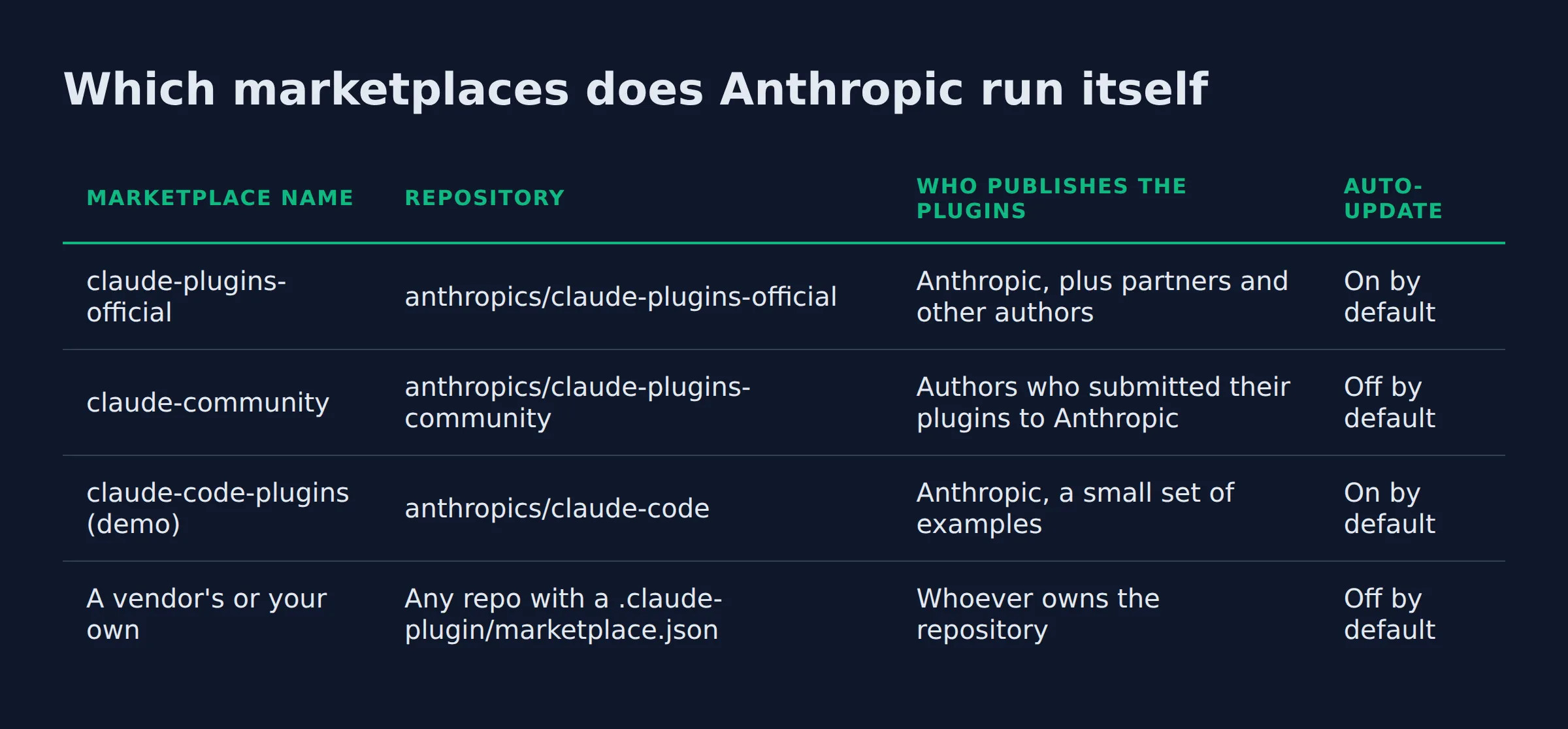
Anthropic publishes 3 general-purpose marketplaces: official (claude-plugins-official), community (claude-community), and demo (claude-code-plugins). Claude Code adds the official one the first time you start an interactive terminal session. It adds no other marketplace on its own.
| Marketplace name | Repository | Who publishes the plugins | Auto-update |
|---|---|---|---|
claude-plugins-official |
anthropics/claude-plugins-official |
Anthropic, plus partners and other authors | On by default |
claude-community |
anthropics/claude-plugins-community |
Authors who submitted their plugins to Anthropic | Off by default |
claude-code-plugins (demo) |
anthropics/claude-code |
Anthropic, a small set of examples | On by default |
| A vendor’s or your own | Any repo with a .claude-plugin/marketplace.json |
Whoever owns the repository | Off by default |
The official catalog is mostly other people’s work. Anthropic maintains a smaller set of its own plugins inside it. Those include commit-commands, code-review, and feature-dev. Tool vendors publish the rest to connect Claude Code to their services.
Anthropic also ships topic marketplaces such as anthropics/skills and anthropics/knowledge-work-plugins. You add those the same way, with /plugin marketplace add <owner>/<repo>, per Anthropic’s marketplaces page.
Names are guarded, which matters when you are deciding who to trust. Claude Code accepts an official or community name only when the marketplace’s source sits under github.com/anthropics/, so a third-party repository cannot present itself as Anthropic’s.
Anthropic’s directory is a fourth surface. It is the catalog on claude.ai, and it does not appear in /plugin. A plugin added there reaches Claude Code through account sync.
The name tells you who owns the catalog. It says nothing about what the plugins inside do.
How do you install a skill from a marketplace?
Add the marketplace once with /plugin marketplace add <owner>/<repo>, then install with /plugin install <plugin>@<marketplace>. The install command opens the plugin’s details panel first, and nothing reaches your disk until you pick a scope and confirm.
Only claude-plugins-official skips the first step. Every other marketplace takes 2 commands.
The details panel matters more than the command. It lists the commands, agents, skills, hooks, and MCP servers the plugin adds. For a plugin with no published component data, it shows what the marketplace entry declares instead.
Then you choose a scope, and the scope decides who gets the plugin:
- User scope: you get it in every project on this machine, recorded in
~/.claude/settings.json. - Project scope: everyone working in the repository gets it, recorded in the committed
.claude/settings.json. - Local scope: you get it in this repository only, recorded in
.claude/settings.local.json.
Where a plugin is set at more than one scope, the local entry wins. It beats the project entry, which beats the user entry.
From a shell, the same job is claude plugin install <plugin>@<marketplace> --scope project. To add a marketplace and install in one step, /plugin install <plugin> --marketplace <owner>/<repo> needs Claude Code v2.1.275 or later, per the install docs.
The files land somewhere specific. Everything Claude Code fetches sits under ~/.claude/plugins/cache/<marketplace>/<plugin>/<version>/, and the plugin reference puts a plugin’s own skills in the skills/ folder at its root.
I install from a marketplace only when the folder does something I have never built. Everything else stays in my own directory of plain markdown skills. The skills bundle I run every day is the same kind of file, readable end to end before you use it.
 AutomateReal skills
User scope is the default, unless the skill belongs to one repository, because an enabled plugin loads in every session.
Marketplace skill vs custom skill you write yourself: which should a small business use?
A marketplace skill is worth installing when you need a capability you have never built. Your own SKILL.md is worth writing when the value is your process. No catalog knows your pricing rules or the way you word a follow-up.
| What you need | Better choice | Why | What it costs you |
|---|---|---|---|
| A capability you have never built | A marketplace skill | Someone already wrote it and maintains it | Context tokens on every turn |
| Your process, run the same way each time | Your own SKILL.md |
Only your file holds your rules and your wording | One file to maintain |
| Both, for one workflow | Install, then wrap it | You keep your house rules on top of the tool | Two things to update |
A marketplace skill is generic by design. Its description field has to sell the same folder to every reader in the catalog.
My own lead generation runs at roughly 200 form submissions a day. The parts that hold up are the skills written around my own rules. Those know what to do when a prospect replies at 11pm.
Writing Claude Code custom skills costs less than people expect. A skill is a directory with one SKILL.md file, and Claude loads the body only when the description matches the task at hand. A narrow skill is cheap to add and easy to delete.
I have not pushed a client’s agent setup into a marketplace yet. I would rather say that than invent a story about one. What I can speak to is the stack I run daily, and the install path here is the one I use.
A catalog can hand you a capability. It cannot hand you the way you talk to your own leads.
Claude skills vs subagents vs MCP servers: what does a marketplace install onto your machine?
A marketplace installs a plugin, and one plugin can hold skills, subagents, hooks, and MCP servers together. Skills and subagents are instructions that reach Claude’s context. Hooks and MCP servers run code, and a plain install enables all of it at once.
| Component | What it is | Runs code | What it costs you |
|---|---|---|---|
| Skill | A SKILL.md folder Claude loads when relevant |
No | Name and description in context on every turn |
| Subagent | A definition Claude can delegate a task to | No | Name and description in context on every turn |
| Hook | A shell command at a point in Claude Code’s lifecycle | Yes, outside the sandbox | Fires whenever its event does |
| MCP server | A tool server Claude Code connects to | Yes, as a process per session | The tools it adds, plus a running process |
The context cost lands even in sessions where nothing from the plugin runs. Anthropic’s plugin overview spells out the trade. For every skill and agent Claude can invoke on its own, the name and description sit in context on every turn. The full text loads only when it is used.
The official marketplace prints a context cost estimate in the details pane, per the plugins overview. Directories that only index GitHub files do not carry that number, because they never see the plugin inside a session.
Permissions cover less than people assume, and the security page is blunt about it. A plugin you install can execute arbitrary code with your user privileges. Hooks and MCP servers run outside the sandbox, so the permission rules you set for Claude’s tool calls do not cover them.
The short list of best Claude Code skills we actually run stayed short for one reason. Each one earns the context it occupies.
Treat every component a plugin declares as its own decision, because a plain install turns them all on at once.
What does a safe marketplace skill look like inside?
A safe marketplace skill is a folder you can read in full. It holds one SKILL.md file with name and description in the frontmatter, plus optional folders for scripts, references, and templates. Every file inside is text you or someone you trust can review.
I run one check before a catalog skill goes anywhere near my machine. The security docs describe each step, and the order is what keeps it quick:
- Find where the marketplace came from. Run
claude plugin marketplace listin a shell and read the source it prints. - Open the details pane. In a session, run
/plugin, then read the Will install section. It names the skills, commands, agents, hooks, and servers the plugin adds. - Read the files that run code. The pane shows that a hook exists, while
hooks/hooks.jsonshows the command it runs. Read that file, the plugin’s.mcp.json, and everything inbin/. - Print the inventory before installing. Run
claude --plugin-dir <plugin directory> plugin details <plugin name>, which reads the plugin’s files without starting a session. After an install,claude plugin details <plugin name>prints the same inventory for the copy under~/.claude/plugins/cache/. - Check the update path. When auto-update is on for a marketplace, the files you just read can change in the background later.
Removal is part of the routine. To take a plugin out, run claude plugin uninstall <plugin> --scope user. Its files sit in the cache for 14 days before a background sweep clears them. Delete the directory yourself if you are pulling a plugin out in a hurry.
One structural detail helps here. The community marketplace pins nearly every plugin to a commit SHA, and Claude Code refuses to install a different commit. That single rule is why I would rather install from claude-community than from a directory that hosts nothing itself.
The install pane shows that a hook exists. Only hooks/hooks.json shows the command it runs.
How do you publish your own skill to a marketplace?
Push a .claude-plugin/marketplace.json file to a git repository and your marketplace exists, with no submission form. List each plugin with a name and a source, then validate the file. Anyone who can reach the repository installs it by its name@marketplace id.
| Route | Who can install | What you need | Do users get updates automatically |
|---|---|---|---|
| Your own marketplace | Anyone who can reach the repository, public or private | A repo with a .claude-plugin/marketplace.json |
Only after they turn auto-update on |
| Anthropic’s directory | People who add it on claude.ai or in Cowork, plus their Claude Code sessions via account sync | A GitHub repository and a paid claude.ai plan | Yes, after your pushed version is published |
Validation is the step people skip. Run claude plugin validate --strict ./your-plugin, which fails the run on warnings such as an unknown manifest field. That strictness is what you want in CI, per the publishing guide.
Names are permanent at the plugin level. People install and configure a plugin by name@marketplace, so after a rename every existing install sees a different plugin.
Versioning decides whether updates ever reach anyone. Set version in plugin.json and push commits without changing it, and claude plugin update says the plugin is already current. Users keep the old copy. Either bump the version on every release, or leave it out in a git-hosted marketplace so Claude Code tracks the commit SHA.
You can also publish without a marketplace at all. A folder or a .zip loads for one session with claude --plugin-dir ./deploy-helper, and moving the plugin folder under ~/.claude/skills/ loads it in every session.
Pick a permanent kebab-case name and settle the versioning question before your first release ships.
For a managed version, see the skills bundle.
Related: Claude Skills vs MCP vs Agents: What’s the Difference?
Related: Claude Code Skills for Agencies: The 2026 Guide
Related: Claude Skills for Small Business: A Practical Guide
FAQ
Is there an official Claude skills marketplace, or only third-party directories?
Both exist. Anthropic publishes the official marketplace along with community and demo catalogs, each defined by its own marketplace.json file. The other sites are independent indexes of public GitHub SKILL.md files. SkillsClaude states on its own front page that it is not endorsed by Anthropic.
Are skills in these marketplaces free, or do some cost money?
Installing is free, because the files sit in public repositories. Money shows up around the edges. Submitting to Anthropic’s directory takes a paid claude.ai plan, and partner products are sold next to the plugins. A bundle like mine sells all skills for $99.
Do marketplace skills work with ChatGPT, Codex or Cursor, or only Claude Code?
The SKILL.md file travels, because the format is an open standard rather than a Claude Code feature. OpenAI’s API docs and Cursor’s docs both document it. The install commands, the hooks, and the plugin mechanics stay inside Claude Code.
Where do installed marketplace skills live on my disk?
Under ~/.claude/plugins/cache/<marketplace>/<plugin>/<version>/, with each plugin’s skills in its own skills/<skill-name>/ folder. Skills you write yourself live at ~/.claude/skills/<skill-name>/SKILL.md for every project, or under .claude/skills/ inside one repository.
What happens to installed skills when a plugin updates?
Auto-update decides. Anthropic turns it on by default for the official marketplaces. It leaves it off for community, third-party, and local ones. A running session keeps the version it loaded until you run /reload-plugins, and the next session picks up the new copy.
Start with one install you can read in full
Pick one plugin you actually want this week. Then run 3 checks before you install:
- Read every file in it before you install it.
- Note the scope you chose.
- Check that you can remove it in one command.
That exercise teaches more than any directory count, and the habit carries over to the skills you write yourself. One folder you have read in full is worth more than a hundred you have not.
If you want help working out which workflow to automate first, a discovery call maps it in about thirty minutes.
 AutomateReal services